
Process Lasso 是一款用于管理和优化计算机进程的软件。它可以帮助用户最大程度地提高计算机的性能,并提供了一系列功能和特点来优化系统的运行。
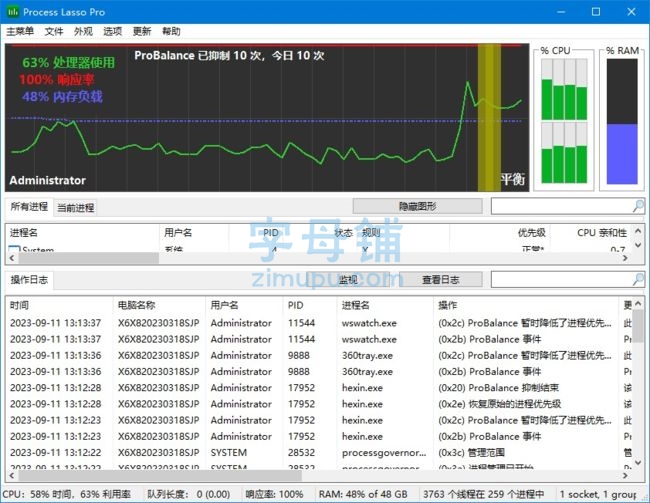
软件功能
进程优先级管理:Process Lasso可以根据用户设定的规则和条件调整进程的优先级,确保重要进程的优先级更高,从而提高系统的响应速度。
自动优化:软件会动态分配计算资源,通过自动调整进程优先级,提高CPU利用率和响应速度。
进程控制:用户可以选择暂停、结束或恢复特定的进程,并设定进程的启动规则。
能耗优化:软件可以根据电源状态自动调整进程的优先级和CPU使用率,以最大程度地节省电池电量。
系统稳定性:通过限制某些进程的CPU使用率,软件可以帮助避免系统崩溃和死机现象。
软件特点
高级优化算法:Process Lasso使用先进的算法来自动调整进程优先级,确保系统的稳定性和性能。
图形化界面:软件提供了直观的图形界面,让用户轻松管理和优化进程。
低系统资源占用:软件运行时占用的系统资源较少,对计算机性能的影响非常小。
可自定义规则:用户可以根据自己的需求和喜好设定进程的优先级规则。
支持多语言:软件支持多种语言界面,方便用户在不同地区使用。
更新日志
Process Lasso – Version History
v18.3.0.34 – Sept 2, 2026
Add Process Startup Boost feature
Add Turkish translation
Minor fixes and enhancements
(1) GUI: Add Turkish translation
(3) GUI/Core: Add Process Startup Boost feature
(7) GUI: Rename the process context menu item “Boost” to “Thread Boost”
(11) GUI: Point in-product documentation links to the new pages
(11) GUI: In all rule dialogs, the DELETE key now removes selected rows
(13) GUI: Improve multi-GPU classification when a GPU Preference rule is set for ProcessLasso.exe itself
(19) GUI: Add component process states to the diagnostics report
(21) GUI: Fix GPU Preference rules being lost in some scenarios
(21) GUI: In the CPU affinity dialog, rename “stagger” to “odd/even” and alternate the pattern on repeated clicks
(23) GUI: Use InstallHelper instead of “net start” in edge cases that require a manual elevated start of the Governor
(25) GUI: Add a Rules column legend as a header tooltip
(31) GUI: Cap CPU Utility % at 100 in the status bar and graph tooltip
(31) GUI: Translation updates
下载地址
Process Lasso Pro 18.3.0.34 Multilingual (2026/09/02)
https://dl.bitsum.com/files/processlassosetup64.exe
https://dl.bitsum.com/files/processlassosetup32.exe
Process Lasso x64 Patch by RadiXX11 (2026/01/02)
https://url04.ctfile.com/d/62829004-64740034-cb064c?p=2025











评论前必须登录!
注册